Thinking Clock - another way to see the time
  • Page:
  • 1
  • 2

TOPIC: Rendering ThinkingRock on a high-resolution screen

Rendering ThinkingRock on a high-resolution screen 8 years 11 months ago #6528

  • tydlitat
  • tydlitat's Avatar
  • Offline
  • Fresh Boarder
  • Posts: 4
  • Karma: 0
I am using ThinkingRock on RedHat Enterprise Linux 7.3, with a high-resolution display (3840 x 2160 px). The display requires setting font scaling (I am using Gnome Tweak Tool / Fonts / Scaling Factor = 1.6), but ThinkingRock does not honor this setting, which results in the font being too small and hard to read. That applies also when I set the font scale first and then start TR. Please, is there any way of controlling the TR font size?
The administrator has disabled public write access.

Rendering ThinkingRock on a high-resolution screen 8 years 10 months ago #6543

  • claire
  • claire's Avatar
  • Offline
  • Moderator
  • Posts: 1383
  • Thank you received: 62
  • Karma: 67
Did you install the latest version 3.7?
The administrator has disabled public write access.

Rendering ThinkingRock on a high-resolution screen 8 years 9 months ago #6566

  • hector
  • hector's Avatar
  • Offline
  • Fresh Boarder
  • Posts: 6
  • Karma: 0
HI I have just installed 3.7.., how can font size be increased ?,...
The administrator has disabled public write access.

Rendering ThinkingRock on a high-resolution screen 8 years 8 months ago #6570

  • tydlitat
  • tydlitat's Avatar
  • Offline
  • Fresh Boarder
  • Posts: 4
  • Karma: 0
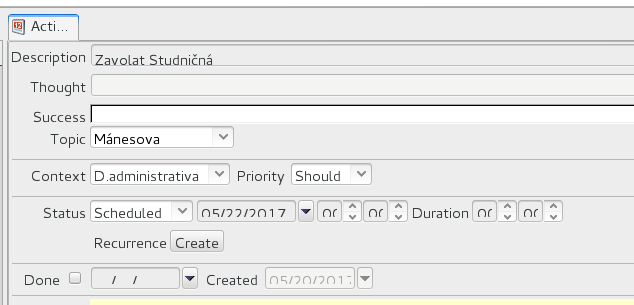
I installed 3.7.0 and so far I did not have the chance to test it on 4k screen (I will report on that in a few days), but I can already see that unlike 3.6.0, which rendered correctly on my laptop built-in screen, 3.7.0. uses a larger font that does not fit in the form fields well at 1920x1080 screen resolution.
The system details: RHEL 7.3, Gnome desktop, 1920x1080 screen resolution, Java release: java-1.8.0-oracle-1.8.0.131-1jpp.1.el7_3.x86_64
Sample screenshot is attached. Note the truncated tab label and date and time fields.
Thank you.
Attachments:
The administrator has disabled public write access.

Rendering ThinkingRock on a high-resolution screen 8 years 8 months ago #6571

  • tydlitat
  • tydlitat's Avatar
  • Offline
  • Fresh Boarder
  • Posts: 4
  • Karma: 0
I tested 3.7.0 on a 4k monitor (3840x2160). The mismatch between font size and form fields I reported for lower resolution is similar. The "Calendar" views (Day, Week, Month, Year) use fonts not sufficiently scaled and almost unreadable on the 4k screen.
To enlarge the screen fonts, I use Gnome Tweak Tools / Fonts / Scaling Factor = 1.5. As in earlier tests, this is on RHEL 7.3.
The administrator has disabled public write access.

Rendering ThinkingRock on a high-resolution screen 8 years 1 month ago #6654

  • tydlitat
  • tydlitat's Avatar
  • Offline
  • Fresh Boarder
  • Posts: 4
  • Karma: 0
I found a way to improve the readability of TR GUI on Linux - switch "Preferred look and feel" from default GTK+ to CDE/Motif. This resolves most of the problems with fonts not fitting in the widgets, at least on my RHEL/Gnome system as specified in earlier comments.
Tools / Options / Appearance / Look and Feel / Preferred look and feel - select CDE/Motif and restart the program.
The administrator has disabled public write access.
  • Page:
  • 1
  • 2
Time to create page: 1.005 seconds

About ThinkingRock

ThinkingRock is developed by Avente Pty Ltd, an Australian registered company.

ThinkingRock is not affiliated with or endorsed by the David Allen Company.

Getting Things Done® and GTD® are registered trademarks of the David Allen Company.

Read more about the ThinkingRock team in this interview on the Netbeans website

Get organized Links

We have compiled a list of useful resources if you want to get organized.

Get In Touch

This email address is being protected from spambots. You need JavaScript enabled to view it.

Cron Job Starts